MiniMax H3 Video Generator: Turn a prompt or a photo into a 15-second clip
Drop in a photo or describe a scene. Get a clip up to 15 seconds long, in 768P or 2K.
Sign up with Google to get free trial credits. No card required.
- Clip length
- Up to 15 s
- Resolution
- 768P · 2K
- Image control
- First + last frame
- If a task fails
- Credits back
Describe the shot, or drop in a first and last frame. Pick the length and resolution, and watch it render in your browser.
Sign up with Google to get free trial credits. No card required.
≈ 66 credits for this video
Credits are used only when a video is generated. If generation fails, they're returned automatically.
Use only content you have the right to submit. Review the Terms, including Acceptable Use, and report safety or abuse issues.
Task
Generation status
Before you start
- 1Name the subject, the action and the camera move, e.g. "slow push-in".
- 2Say where the light comes from and the mood you want.
- 3For image to video, describe only what should move in the photo.
Every H3 video includes sound. To get music, sound effects or dialogue, describe them in your prompt, e.g. “soft piano music, waves on the shore”. If you leave it out, the model picks the sound itself, often just quiet ambience.
Made with MiniMax H3
See it, then make your own
Clips made by our team with MiniMax H3. Pick one, reuse the prompt, and change it to fit your idea.
Dreamy fantasy world
Try a similar prompt
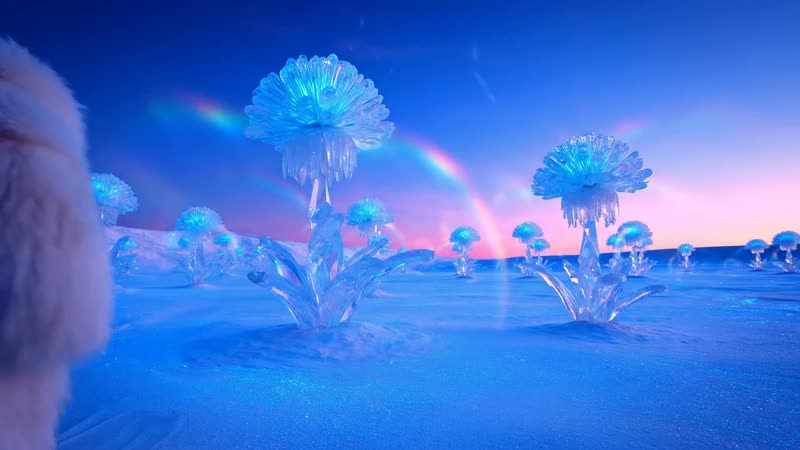
A fluffy white creature waddles across a glowing blue plain toward giant crystal flowers shaped like jellyfish. Soft rainbow in a pastel sky, gentle footprints in the ground, slow tracking shot from behind.
Character at a festival
Try a similar prompt
A big fluffy polar bear wearing headphones DJs on a festival main stage at sunset. A huge crowd cheers, sparklers fire into the air, the bear raises a paw. Wide shot from behind the decks.
High-speed action
Try a similar prompt
Onboard camera on the nose of a vintage red-and-white Formula 1 car racing through a narrow old Italian town. Stone buildings blur past, sunlight on the bodywork, low and fast.
Macro nature story
Try a similar prompt
Macro shot of a tiny ant carrying a crumb of bread across a sunny gravel path, then into the shade under a stone ledge. Shallow depth of field, ground-level camera following it.
MiniMax H3 Video Generator Pricing
Credit plans for MiniMax H3 text-to-video and image-to-video tasks. The credits used per video depend on its resolution and duration.
Video counts assume 6-second clips at 768P. 2K and longer clips use more credits.
Basic Plan
Try MiniMax H3 text-to-video and image-to-video: 4–15 second clips at 768P or 2K.
≈ 5 videos / month
- 360 credits monthly
- Text-to-video and image-to-video
- 4–15 second clips at 768P or 2K
- Email support
Pro Plan
MiniMax H3 text-to-video and image-to-video. Set a first frame, a last frame, or both, and generate 4–15 second clips at 768P or 2K.
≈ 23 videos / month
- 1520 credits monthly
- Text-to-video and image-to-video
- 4–15 second clips at 768P or 2K
- Email support
Max Plan
Product clips, e-commerce visuals, social posts and storyboards, from a prompt or a single image.
≈ 54 videos / month
- 3600 credits monthly
- Text-to-video and image-to-video
- 4–15 second clips at 768P or 2K
- Email support
Ultra Plan
For enterprise & studio teams
≈ 121 videos / month
- 8000 credits monthly
- Text-to-video and image-to-video
- 4–15 second clips at 768P or 2K
- Email support
Learn more
About the MiniMax H3 video generator
h3minimax.com gives you a simple interface to the MiniMax H3 video model. You write a prompt or upload a frame, choose a few documented settings, and the service tracks the task and shows the result in your browser.
Start from text or an image
Describe the scene in a prompt of up to 7,000 characters, or add a first frame, a last frame, or both to guide image-to-video.
Clear, documented settings
Choose a whole-number duration from 4 to 15 seconds, 768P or 2K resolution, and, for text-to-video, one of six aspect ratios.
01
Describe or upload
Write a prompt, or upload a first and/or last frame you have the rights to use.
02
Choose settings
Pick the duration, resolution, and (for text-to-video) the aspect ratio.
03
Track the result
The task status updates automatically, and the finished video plays in the page.
Only the options listed below are offered on this site. Each one maps to a documented setting of the MiniMax H3 text-to-video or image-to-video model.
Text to video
Describe the scene, the camera and the mood. Get a 4–15 second clip from the MiniMax H3 text-to-video model.
- Prompts up to 7,000 characters
- Aspect ratios: 21:9, 16:9, 4:3, 1:1, 3:4, 9:16
- Whole-number durations from 4 to 15 seconds
Image to video
Set the first frame, the last frame, or both. Your product shot or character stays the anchor while H3 adds the motion.
- JPEG, PNG, or WebP up to 5 MB
- 256–5760 px per side
- Upload only images you own or have permission to use
Any length, any format
4 to 15 seconds. 768P for drafts, 2K for final cuts. Six aspect ratios, from 21:9 to 9:16, for text-to-video.
- 4 to 15 seconds
- 768P or 2K
- Cost depends on resolution and duration
Failed? Credits come back.
Every task is tracked on the server. Credits are reserved when a task starts and released automatically if generation fails.
- Automatic status updates
- Failed tasks release reserved credits
- Retries reuse the same task instead of creating duplicates
Pick a mode, describe what you want, choose the settings, and generate. It takes a few minutes per clip.
- 1
Choose a mode
Select text-to-video, or image-to-video if you want to start or end on a specific frame.
- 2
Write your prompt
Describe the subject, setting, motion, and camera. For image-to-video, upload a first and/or last frame you have rights to.
- 3
Pick the settings
Choose a duration from 4 to 15 seconds, 768P or 2K, and an aspect ratio for text-to-video.
- 4
Generate and review
Confirm the content attestation, submit, and watch the status until the finished clip appears.
Short AI-generated clips for drafts and original creative work, made from your own prompts and images.
Built for ads and social
Product clips, e-commerce visuals, storyboards and social posts, from one prompt or one photo.
Test ideas before you shoot
Try a scene, a camera move or a mood in minutes, before investing in a full production.
Text to video
Generate a 4–15 second clip from a written description at 768P or 2K, in an aspect ratio that fits the channel you are creating for.
Image to video
Bring your own still image to life by using it as the first or last frame. Only use images you created or are licensed to use, and never a real person's likeness without their consent.
A straightforward way to run MiniMax H3 video tasks, with clear limits and rules.
Pay only for generated videos
Credits are reserved when a task starts and returned automatically if generation fails, so a failed task never costs you anything.
Documented limits only
Every option in the generator maps to a documented MiniMax H3 setting: two modes, 4–15 seconds, 768P or 2K, and six text-to-video aspect ratios.
Responsible use
Prompts and uploads are screened before generation. Sexual content, any content involving minors, and a real person's likeness without consent are not allowed.
MiniMax H3 Video Generator FAQ
Answers about what this service does, the supported settings, credits, and content rules.
A web app for creating short videos with the MiniMax H3 video model, from a text prompt or a first and last frame.
Short videos from a text prompt (text-to-video), or from a first and/or last frame image plus a prompt (image-to-video). Image generation, video-to-video, and video editing are not offered.
Any whole-number duration from 4 to 15 seconds, at 768P or 2K. Text-to-video supports 21:9, 16:9, 4:3, 1:1, 3:4, and 9:16 aspect ratios; image-to-video follows the uploaded frame.
JPEG, PNG, or WebP files up to 5 MB, 256–5760 px per side. Upload only images you created or have permission to use, and never a real person's likeness without their consent.
Credits are calculated on the server from the resolution and duration, reserved when a task is accepted, and released automatically if the generation fails.
Sexual content, any content involving minors, a real person's likeness without their consent, and content that infringes others' rights are prohibited. Prompts and uploads are screened before generation, and violations lead to account suspension. See the Acceptable Use section of the Terms.
Start Creating with MiniMax H3
Generate 4–15 second text-to-video and image-to-video clips at 768P or 2K in your browser.